查看 NVIDIA 显卡状态
查看显卡设备
lspci -nn | grep -E "VGA|3D|Display"00:01.0 VGA compatible controller [0300]: Device [1234:1111] (rev 02)
01:00.0 VGA compatible controller [0300]: NVIDIA Corporation GA102 [GeForce RTX 3080] [10de:2206] (rev a1)
02:00.0 VGA compatible controller [0300]: NVIDIA Corporation GA102 [GeForce RTX 3080] [10de:2206] (rev a1)
03:00.0 VGA compatible controller [0300]: NVIDIA Corporation GA102 [GeForce RTX 3080] [10de:2206] (rev a1)
04:00.0 VGA compatible controller [0300]: NVIDIA Corporation GA102 [GeForce RTX 3080] [10de:2206] (rev ff)
05:00.0 VGA compatible controller [0300]: NVIDIA Corporation GA102 [GeForce RTX 3080] [10de:2206] (rev a1)
06:00.0 VGA compatible controller [0300]: NVIDIA Corporation GA102 [GeForce RTX 3080] [10de:2206] (rev a1)
07:00.0 VGA compatible controller [0300]: NVIDIA Corporation GA102 [GeForce RTX 3080] [10de:2206] (rev a1)
08:00.0 VGA compatible controller [0300]: NVIDIA Corporation GA102 [GeForce RTX 3080] [10de:2206] (rev a1)列出 PCI 总线 ID
lspci -Dnnd 10de: | grep -E "0300|0302" | awk '{print $1}' | sort0000:01:00.0
0000:02:00.0
0000:03:00.0
0000:04:00.0
0000:05:00.0
0000:06:00.0
0000:07:00.0
0000:08:00.0列出 NVIDIA GPU
nvidia-smi --query-gpu=index,pci.bus_id,name --format=csv,noheader | sortUnable to determine the device handle for GPU3: 0000:04:00.0: Unknown Error
0, 00000000:01:00.0, NVIDIA GeForce RTX 3080
1, 00000000:02:00.0, NVIDIA GeForce RTX 3080
2, 00000000:03:00.0, NVIDIA GeForce RTX 3080
# Missing :04:00.0
4, 00000000:05:00.0, NVIDIA GeForce RTX 3080
5, 00000000:06:00.0, NVIDIA GeForce RTX 3080
6, 00000000:07:00.0, NVIDIA GeForce RTX 3080
7, 00000000:08:00.0, NVIDIA GeForce RTX 3080对比 lspci 和 nvidia-smi 的结果,可以看到掉卡的是 0000:04:00.0。
查看显卡详情
异常卡的信息:
sudo lspci -vvv -s 0000:04:00.0 | egrep -i "Physical Slot|LnkSta|LnkCap|Kernel driver|Subsystem"Subsystem: NVIDIA Corporation GA102 [GeForce RTX 3080 20GB]
Physical Slot: 0-6
LnkCap: Port #0, Speed 16GT/s, Width x16, ASPM L0s L1, Exit Latency L0s <512ns, L1 <4us
LnkSta: Speed 2.5GT/s (downgraded), Width x4 (downgraded)
LnkCap2: Supported Link Speeds: 2.5-16GT/s, Crosslink- Retimer+ 2Retimers+ DRS-
LnkSta2: Current De-emphasis Level: -6dB, EqualizationComplete- EqualizationPhase1-
Kernel driver in use: nvidia# 或者只有一行
Kernel driver in use: nvidia查看正常卡的信息
sudo lspci -vvv -s 0000:05:00.0 | egrep -i "Physical Slot|LnkSta|LnkCap|Kernel driver|Subsystem"Subsystem: NVIDIA Corporation GA102 [GeForce RTX 3080 20GB]
Physical Slot: 0-5
LnkCap: Port #0, Speed 8GT/s, Width x16, ASPM L0s L1, Exit Latency L0s <512ns, L1 <4us
LnkSta: Speed 2.5GT/s (downgraded), Width x16 (ok)
LnkCap2: Supported Link Speeds: 2.5-16GT/s, Crosslink- Retimer+ 2Retimers+ DRS-
LnkSta2: Current De-emphasis Level: -6dB, EqualizationComplete+ EqualizationPhase1+
Kernel driver in use: nvidia查看绑定驱动
sudo lspci -nnk -s 0000:04:00.004:00.0 VGA compatible controller [0300]: NVIDIA Corporation GA102 [GeForce RTX 3080] [10de:2206] (rev a1)
Subsystem: NVIDIA Corporation GA102 [GeForce RTX 3080 20GB] [10de:146d]
Kernel driver in use: nvidia
Kernel modules: nvidiafb, nouveau, nvidia_drm, nvidia在 PVE 中查看 VM 状态
列出 VM
qm listVMID NAME STATUS MEM(MB) BOOTDISK(GB) PID
101 AI-122 running 94208 2048.00 3544
301 win10 stopped 65536 500.00 0停止 VM
qm stop 101启动 VM
qm start 101在 PVE 中查看 VM GPU 状态
列出 Slot 映射
dmidecode -t slot | awk -F': ' ' /Designation:/ {d=$2} /Bus Address:/ {print $2 "\t" d} ' | sort0000:00:1c.0 PCH Slot7 PCI-E 3.0 X4
0000:1a:00.0 CPU1 Slot10 PCI-E 3.0 X16
0000:1b:00.0 CPU1 Slot11 PCI-E 3.0 X16
0000:3d:00.0 CPU1 Slot8 PCI-E 3.0 X16
0000:3e:00.0 CPU1 Slot9 PCI-E 3.0 X16
0000:5d:00.0 CPU1 Slot6 PCI-E 3.0 X8
0000:88:00.0 CPU2 Slot1 PCI-E 3.0 X16
0000:89:00.0 CPU2 Slot2 PCI-E 3.0 X16
0000:b1:00.0 CPU2 Slot3 PCI-E 3.0 X16
0000:b2:00.0 CPU2 Slot4 PCI-E 3.0 X16
0000:d7:02.0 CPU2 Slot5 PCI-E 3.0 X8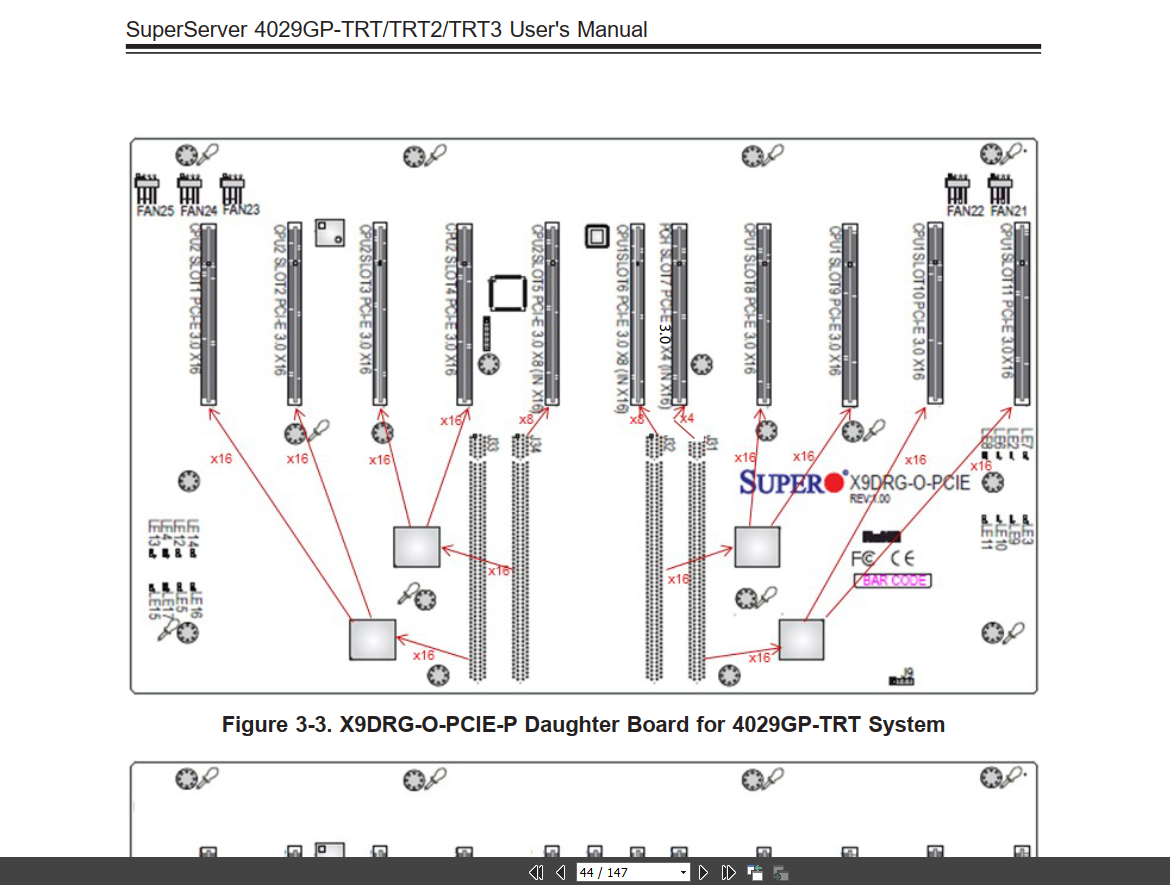
图中从左到右分别为:
- 4x:
SLOT 1/2/3/4 (3.0x16) - 2x:
SLOT 5/6 (3.0x8) - 1x:
SLOT 7 (3.0x4) - 4x:
SLOT 8/9/10/11 (3.0x16)
SLOT 和 GPU 对应关系
一般显卡都插在 SLOT 1/2/3/4 和 SLOT 8/9/10/11 的 3.0x16 插槽上。 那么 8 张显卡的 PCIe BDF 和 SLOT 对应关系为:
    PCIe BDF       SLOT ID   GPU ID
--  ------------   -------   ------
 1  0000:88:00.0   SLOT  1   GPU 0
 2  0000:89:00.0   SLOT  2   GPU 1
 3  0000:b1:00.0   SLOT  3   GPU 2
 4  0000:b2:00.0   SLOT  4   GPU 3
 5  0000:3d:00.0   SLOT  8   GPU 4
 6  0000:3e:00.0   SLOT  9   GPU 5
 7  0000:1a:00.0   SLOT 10   GPU 6
 8  0000:1b:00.0   SLOT 11   GPU 7
列出 NVIDIA GPU 的 BDF
lspci -D | awk '/NVIDIA Corporation/ && /(VGA compatible controller|3D controller)/{print $1}'0000:1a:00.0
0000:1b:00.0
0000:3d:00.0
0000:3e:00.0
0000:88:00.0
0000:89:00.0
0000:b1:00.0
0000:b2:00.0查看直通 PCI 设备
qm config 101 | grep -E '^hostpci'hostpci0: 0000:3d:00,pcie=1
hostpci1: 0000:3e:00,pcie=1
hostpci2: 0000:1a:00,pcie=1
hostpci3: 0000:1b:00,pcie=1
hostpci4: 0000:b1:00,pcie=1
hostpci5: 0000:b2:00,pcie=1
hostpci6: 0000:89:00,pcie=1
hostpci7: 0000:88:00,pcie=1hostpciN 是 PVE 配置键,也是 QEMU 设备 ID 的一部分;它不是 NVIDIA 的 GPU index,也不是稳定的 VM PCI 总线号。
注意:hostpci 被压缩或重排后,QEMU 会重新分配 PCIe root port 和 VM 内的 bus number。,也不能 复用上一次启动时记录的映射。运行中的 VM 必须以 QEMU info pci 为准。
查看设备映射
qm showcmd 101 --pretty | egrep -n "vfio-pci|hostpci" -n28: -device 'vfio-pci,host=0000:3d:00.0,id=hostpci0.0,bus=ich9-pcie-port-1,addr=0x0.0,multifunction=on' \
29: -device 'vfio-pci,host=0000:3d:00.1,id=hostpci0.1,bus=ich9-pcie-port-1,addr=0x0.1' \
30: -device 'vfio-pci,host=0000:3e:00.0,id=hostpci1.0,bus=ich9-pcie-port-2,addr=0x0.0,multifunction=on' \
31: -device 'vfio-pci,host=0000:3e:00.1,id=hostpci1.1,bus=ich9-pcie-port-2,addr=0x0.1' \
32: -device 'vfio-pci,host=0000:1a:00.0,id=hostpci2.0,bus=ich9-pcie-port-3,addr=0x0.0,multifunction=on' \
33: -device 'vfio-pci,host=0000:1a:00.1,id=hostpci2.1,bus=ich9-pcie-port-3,addr=0x0.1' \
34: -device 'vfio-pci,host=0000:1b:00.0,id=hostpci3.0,bus=ich9-pcie-port-4,addr=0x0.0,multifunction=on' \
35: -device 'vfio-pci,host=0000:1b:00.1,id=hostpci3.1,bus=ich9-pcie-port-4,addr=0x0.1' \
37: -device 'vfio-pci,host=0000:b1:00.0,id=hostpci4.0,bus=ich9-pcie-port-5,addr=0x0.0,multifunction=on' \
38: -device 'vfio-pci,host=0000:b1:00.1,id=hostpci4.1,bus=ich9-pcie-port-5,addr=0x0.1' \
40: -device 'vfio-pci,host=0000:b2:00.0,id=hostpci5.0,bus=ich9-pcie-port-6,addr=0x0.0,multifunction=on' \
41: -device 'vfio-pci,host=0000:b2:00.1,id=hostpci5.1,bus=ich9-pcie-port-6,addr=0x0.1' \
43: -device 'vfio-pci,host=0000:89:00.0,id=hostpci6.0,bus=ich9-pcie-port-7,addr=0x0.0,multifunction=on' \
44: -device 'vfio-pci,host=0000:89:00.1,id=hostpci6.1,bus=ich9-pcie-port-7,addr=0x0.1' \
46: -device 'vfio-pci,host=0000:88:00.0,id=hostpci7.0,bus=ich9-pcie-port-8,addr=0x0.0,multifunction=on' \
47: -device 'vfio-pci,host=0000:88:00.1,id=hostpci7.1,bus=ich9-pcie-port-8,addr=0x0.1' \qm showcmd 展示的是按当前配置生成的启动命令。排查已经运行的 VM 时,应读取 QEMU 的实时拓扑:
pvesh create /nodes/$(hostname)/qemu/101/monitor --command 'info pci'查看内核日志
journalctl -k -b | egrep -i "vfio|D3cold|D3hot|device inaccessible|pcieport|retraining|AER|NVRM|Xid" | tail -n 300Jan 15 01:48:25 pve kernel: vfio-pci 0000:89:00.1: resetting
Jan 15 01:48:25 pve kernel: vfio-pci 0000:89:00.0: reset done
Jan 15 01:48:25 pve kernel: vfio-pci 0000:89:00.1: reset done
Jan 15 01:48:25 pve kernel: vfio-pci 0000:88:00.0: Unable to change power state from D3cold to D0, device inaccessible
Jan 15 01:48:26 pve kernel: vfio-pci 0000:88:00.0: timed out waiting for pending transaction; performing function level reset anyway
Jan 15 01:48:26 pve kernel: vfio-pci 0000:88:00.1: Unable to change power state from D3cold to D0, device inaccessible
Jan 15 01:48:26 pve kernel: vfio-pci 0000:88:00.0: resetting
Jan 15 01:48:26 pve kernel: vfio-pci 0000:88:00.0: Unable to change power state from D3cold to D0, device inaccessible
Jan 15 01:48:26 pve kernel: vfio-pci 0000:88:00.1: resetting
Jan 15 01:48:26 pve kernel: vfio-pci 0000:88:00.1: Unable to change power state from D3cold to D0, device inaccessible
Jan 15 01:48:27 pve kernel: pcieport 0000:87:08.0: Data Link Layer Link Active not set in 100 msec
Jan 15 01:48:27 pve kernel: vfio-pci 0000:88:00.0: reset done
Jan 15 01:48:27 pve kernel: vfio-pci 0000:88:00.1: reset done
Jan 15 01:48:27 pve kernel: vfio-pci 0000:88:00.1: Unable to change power state from D3cold to D0, device inaccessible
Jan 15 01:48:27 pve kernel: vfio-pci 0000:88:00.0: Unable to change power state from D3cold to D0, device inaccessible排查正在运行的直通 GPU 掉卡
先在 VM 内保留故障现场
不要先重启 VM。先找出发生 Xid 79 的 VM BDF,并检查该端点是否已经变成 rev ff:
nvidia-smi

for f in /proc/driver/nvidia/gpus/*/information; do
  index=$(awk -F: '/Device Minor:/ {gsub(/[[:space:]]/, "", $2); print $2}' "$f")
  nvidia-smi -i "$index" \
    --query-gpu=index,name,pci.bus_id,temperature.gpu,pstate,power.draw \
    --format=csv,noheader
  echo "index=$index rc=$?"
done

lspci -Dnn | grep -i NVIDIA
journalctl -k -b -o short-iso --no-pager \
  | grep -Ei 'NVRM: Xid|fallen off the bus|PCIe Bus Error'
WARNING
一次掉卡后,整张 nvidia-smi 表仍可能返回成功,同时直接漏掉故障行。因此需要 逐 index 检查返回码,并和 /proc/driver/nvidia/gpus/*/information、lspci 交叉验证。
判断日志时:
Xid 79: GPU has fallen off the bus所在的 BDF 才是主要故障端点。- 同一时刻其他 GPU 上的
Xid 154: Node Reboot Required可能只是全局恢复动作, 不能据此把所有 GPU 都隔离。 - VM 中的
rev ff表示配置空间已经无法读取,是掉卡的强证据。
从 VM BDF 映射到宿主机 BDF
使用只读诊断脚本,参数是 VM 内 Xid 79 对应的 BDF:
/root/diagnose_vm_gpu.sh 101 0000:06:00.0输出形如:
guest_bdf=0000:06:00.0
qemu_id=hostpci2.0
hostpci_key=hostpci2
host_bdf=0000:3e:00
host_config_vendor=ffff
physical_slot=CPU1 Slot9 PCI-E 3.0 X16
numa_node=0
iommu_group=10
endpoint_health=unresponsive
脚本还会打印 sysfs 拓扑和各级上游桥的 LnkSta、DevSta、UESta、 CESta。其中最有价值的是故障卡的直接上游端口:
LnkSta: Speed 5GT/s, Width x0
DevSta: CorrErr+ NonFatalErr+ FatalErr+
UESta: ... SDES+ ...
这组状态表示 PLX 下游链路发生 Surprise Down。排查顺序应优先放在对应物理槽位的 显卡供电、PSU 端连接、线缆/转接板、插槽和接触问题,而不是 NVIDIA 驱动。
物理位置优先使用 dmidecode -t slot 中与 GPU 端点 Bus Address 对应的 Designation,例如 CPU1 Slot11。上游 root port 的 Physical Slot: 1 是桥自身报告的槽号;经过 PLX 后,它不一定就是机箱或主板上标注的 GPU 插槽号, 不能直接把二者等同。更换显卡位置后,BDF 标识的是新位置,历史上的掉卡或温度 记录不能自动归到当前占用该 BDF 的显卡上。
TIP
lspci -Dnn -s HOST_BDF 可能仍显示缓存的型号和 rev a1,不能单独证明设备健康。 应读取实时配置空间:
setpci -s 3e:00.0 VENDOR_ID.w正常 NVIDIA 端点应返回 10de;ffff 或无响应表示端点已经失联。直通场景下, PVE 内核日志在故障时段也可能没有 AER 记录,不能用“宿主机日志为空”否定 VM 内 Xid 79、配置空间 ffff 和上游 Width x0/SDES+ 的证据链。
只读诊断脚本:
#!/usr/bin/env bash

set -Eeuo pipefail

VMID=101
GUEST_BDF=""
QM_TIMEOUT="${QM_TIMEOUT:-30}"
LSPCI_TIMEOUT="${LSPCI_TIMEOUT:-3}"

log() {
	printf '[%s] %s\n' "$(date '+%F %T')" "$*" >&2
}

die() {
	printf '[%s] ERROR: %s\n' "$(date '+%F %T')" "$*" >&2
	exit 1
}

usage() {
	cat <<'EOF'
Usage:
  diagnose_vm_gpu.sh [VMID] GUEST_BDF

Example:
  diagnose_vm_gpu.sh 101 0000:06:00.0

The script is read-only. It maps a guest PCI endpoint from the live QEMU
"info pci" topology to the corresponding PVE hostpci key and host BDF, then
prints the host endpoint, DMI slot, sysfs path and upstream PCIe link/error
status. Do not infer this mapping from hostpci numbering: guest bus numbering
can change whenever hostpci entries are compacted or reordered.
EOF
}

require_cmd() {
	command -v "$1" >/dev/null 2>&1 || die "missing required command: $1"
}

normalize_guest_endpoint() {
	local raw="${1%%,*}"

	raw="${raw,,}"
	if [[ "$raw" =~ ^[0-9a-f]{8}:([0-9a-f]{2}:[0-9a-f]{2}(\.[0-7])?)$ ]]; then
		raw="${BASH_REMATCH[1]}"
	fi
	if [[ "$raw" =~ ^[0-9a-f]{2}:[0-9a-f]{2}$ ]]; then
		raw="${raw}.0"
	fi
	if [[ "$raw" =~ ^[0-9a-f]{2}:[0-9a-f]{2}\.[0-7]$ ]]; then
		raw="0000:${raw}"
	fi
	if [[ "$raw" =~ ^[0-9a-f]{4}:[0-9a-f]{2}:[0-9a-f]{2}$ ]]; then
		raw="${raw}.0"
	fi

	[[ "$raw" =~ ^[0-9a-f]{4}:[0-9a-f]{2}:[0-9a-f]{2}\.[0-7]$ ]] || return 1
	printf '%s\n' "$raw"
}

normalize_host_base() {
	local raw="${1%%,*}"

	raw="${raw,,}"
	if [[ "$raw" =~ ^[0-9a-f]{2}:[0-9a-f]{2}(\.[0-7])?$ ]]; then
		raw="0000:${raw}"
	fi
	if [[ "$raw" =~ ^[0-9a-f]{4}:[0-9a-f]{2}:[0-9a-f]{2}(\.[0-7])?$ ]]; then
		printf '%s\n' "${raw%.*}"
		return 0
	fi
	return 1
}

parse_args() {
	if [[ $# -gt 0 && "$1" != --* && "$1" =~ ^[1-9][0-9]*$ ]]; then
		VMID="$1"
		shift
	fi

	while [[ $# -gt 0 ]]; do
		case "$1" in
			-h|--help)
				usage
				exit 0
				;;
			--guest-bdf)
				[[ $# -ge 2 ]] || die "--guest-bdf requires a BDF"
				GUEST_BDF="$2"
				shift 2
				;;
			--*)
				die "unknown argument: $1"
				;;
			*)
				[[ -z "$GUEST_BDF" ]] || die "unexpected extra argument: $1"
				GUEST_BDF="$1"
				shift
				;;
		esac
	done
}

map_guest_to_qemu_id() {
	local monitor_output="$1"
	local guest_endpoint="$2"
	local rest="${guest_endpoint#*:}"
	local bus_hex="${rest%%:*}"
	local devfunc="${rest#*:}"
	local dev_hex="${devfunc%%.*}"
	local function_dec="${devfunc##*.}"
	local bus_dec=$((16#${bus_hex}))
	local device_dec=$((16#${dev_hex}))
	local in_target=0
	local line

	while IFS= read -r line; do
		if [[ "$line" =~ Bus[[:space:]]+([0-9]+),[[:space:]]+device[[:space:]]+([0-9]+),[[:space:]]+function[[:space:]]+([0-9]+): ]]; then
			if ((10#${BASH_REMATCH[1]} == bus_dec &&
				10#${BASH_REMATCH[2]} == device_dec &&
				10#${BASH_REMATCH[3]} == function_dec)); then
				in_target=1
			else
				in_target=0
			fi
			continue
		fi
		if [[ "$in_target" -eq 1 && "$line" =~ id[[:space:]]+\"(hostpci[0-9]+\.[0-7])\" ]]; then
			printf '%s\n' "${BASH_REMATCH[1]}"
			return 0
		fi
	done <<<"$monitor_output"

	return 1
}

dmi_slot_for_endpoint() {
	local endpoint="$1"

	dmidecode -t slot 2>/dev/null | awk -v target="$endpoint" '
		BEGIN { RS = ""; FS = "\n"; IGNORECASE = 1 }
		{
			designation = ""
			bus = ""
			for (i = 1; i <= NF; i++) {
				if ($i ~ /^[[:space:]]*Designation:/) {
					designation = $i
					sub(/^[[:space:]]*Designation:[[:space:]]*/, "", designation)
				}
				if ($i ~ /^[[:space:]]*Bus Address:/) {
					bus = $i
					sub(/^[[:space:]]*Bus Address:[[:space:]]*/, "", bus)
				}
			}
			if (tolower(bus) == tolower(target)) {
				print designation
				exit
			}
		}
	'
}

print_upstream_diagnostics() {
	local sysfs_path="$1"
	local endpoint="$2"
	local bdf
	local details
	local -a path_bdfs=()

	mapfile -t path_bdfs < <(grep -oE '0000:[0-9a-f]{2}:[0-9a-f]{2}\.[0-7]' <<<"$sysfs_path")
	((${#path_bdfs[@]} > 1)) || {
		printf 'upstream_status=unavailable\n'
		return 0
	}

	printf '%s\n' 'upstream_bridges:'
	for bdf in "${path_bdfs[@]:0:${#path_bdfs[@]}-1}"; do
		printf '  [%s] %s\n' "$bdf" "$(timeout "$LSPCI_TIMEOUT" lspci -Dnn -s "$bdf" 2>/dev/null || true)"
		details="$(timeout "$LSPCI_TIMEOUT" lspci -Dvv -s "$bdf" 2>/dev/null || true)"
		grep -E 'Physical Slot|DevSta:|LnkCap:|LnkSta:|LnkSta2:|UESta:|CESta:|RootSta:' <<<"$details" |
			sed 's/^/    /' || true
	done

	# Keep the endpoint parameter visible in shell traces and make accidental
	# calls with a mismatched path easier to spot during review.
	[[ "${path_bdfs[-1]}" == "$endpoint" ]] ||
		log "WARN: sysfs path ends at ${path_bdfs[-1]}, expected ${endpoint}"
}

main() {
	local guest_endpoint
	local pve_node
	local monitor_output
	local qemu_id
	local hostpci_key
	local hostpci_value
	local host_base
	local host_endpoint
	local config_vendor
	local sysfs_path
	local physical_slot
	local numa_node="unknown"
	local iommu_group="unknown"
	local status

	parse_args "$@"
	[[ "$VMID" =~ ^[1-9][0-9]*$ ]] || die "invalid VMID: ${VMID}"
	[[ -n "$GUEST_BDF" ]] || {
		usage >&2
		exit 1
	}
	guest_endpoint="$(normalize_guest_endpoint "$GUEST_BDF" || true)"
	[[ -n "$guest_endpoint" ]] || die "invalid guest BDF: ${GUEST_BDF}"

	[[ $EUID -eq 0 ]] || die "this script must run as root on the PVE host"
	require_cmd qm
	require_cmd pvesh
	require_cmd hostname
	require_cmd timeout
	require_cmd lspci
	require_cmd setpci
	require_cmd dmidecode
	[[ -f "/etc/pve/qemu-server/${VMID}.conf" ]] ||
		die "VM config not found for VM ${VMID}"

	status="$(timeout "$QM_TIMEOUT" qm status "$VMID" 2>/dev/null | awk '{print $2}')"
	[[ "$status" == running ]] || die "VM ${VMID} must be running to inspect its live QEMU topology"
	pve_node="$(hostname)"
	monitor_output="$(timeout "$QM_TIMEOUT" pvesh create \
		"/nodes/${pve_node}/qemu/${VMID}/monitor" \
		--command 'info pci' 2>/dev/null | tr -d '\r')" ||
		die "failed to read QEMU info pci for VM ${VMID}"
	qemu_id="$(map_guest_to_qemu_id "$monitor_output" "$guest_endpoint" || true)"
	[[ -n "$qemu_id" ]] ||
		die "guest endpoint ${guest_endpoint} was not mapped to a hostpci device in live QEMU"

	hostpci_key="${qemu_id%%.*}"
	hostpci_value="$(qm config "$VMID" | awk -F': ' -v key="$hostpci_key" '$1 == key { print $2; exit }')"
	[[ -n "$hostpci_value" ]] || die "${hostpci_key} is absent from VM ${VMID} config"
	host_base="$(normalize_host_base "$hostpci_value" || true)"
	[[ -n "$host_base" ]] || die "${hostpci_key} does not contain a direct host BDF: ${hostpci_value}"
	host_endpoint="${host_base}.0"
	config_vendor="$(timeout "$LSPCI_TIMEOUT" setpci -s "$host_endpoint" VENDOR_ID.w 2>/dev/null || true)"
	config_vendor="${config_vendor,,}"
	sysfs_path="$(readlink -f "/sys/bus/pci/devices/${host_endpoint}" 2>/dev/null || true)"
	physical_slot="$(dmi_slot_for_endpoint "$host_endpoint" || true)"
	if [[ -r "/sys/bus/pci/devices/${host_endpoint}/numa_node" ]]; then
		numa_node="$(<"/sys/bus/pci/devices/${host_endpoint}/numa_node")"
	fi
	if [[ -e "/sys/bus/pci/devices/${host_endpoint}/iommu_group" ]]; then
		iommu_group="$(basename "$(readlink -f "/sys/bus/pci/devices/${host_endpoint}/iommu_group")")"
	fi

	printf 'vmid=%s\n' "$VMID"
	printf 'guest_bdf=%s\n' "$guest_endpoint"
	printf 'qemu_id=%s\n' "$qemu_id"
	printf 'hostpci_key=%s\n' "$hostpci_key"
	printf 'hostpci_value=%s\n' "$hostpci_value"
	printf 'host_bdf=%s\n' "$host_base"
	printf 'host_endpoint=%s\n' "$host_endpoint"
	printf 'host_config_vendor=%s\n' "${config_vendor:-no-response}"
	printf 'physical_slot=%s\n' "${physical_slot:-unknown}"
	printf 'numa_node=%s\n' "$numa_node"
	printf 'iommu_group=%s\n' "$iommu_group"
	printf 'sysfs_path=%s\n' "${sysfs_path:-absent}"
	printf 'cached_endpoint_identity=%s\n' \
		"$(timeout "$LSPCI_TIMEOUT" lspci -Dnn -s "$host_endpoint" 2>/dev/null || true)"

	if [[ "$config_vendor" == ffff || -z "$config_vendor" ]]; then
		printf 'endpoint_health=unresponsive\n'
	else
		printf 'endpoint_health=config-space-responding\n'
	fi
	[[ -n "$sysfs_path" ]] && print_upstream_diagnostics "$sysfs_path" "$host_endpoint"
}

if [[ "${BASH_SOURCE[0]}" == "$0" ]]; then
	main "$@"
fi
隔离故障卡并安全重启
确认宿主机 BDF 后,先写入持久隔离记录:
/root/qm_gpus.sh 101 --quarantine 0000:3e:00 \
  --reason 'guest Xid 79; host config ffff; upstream Width x0 and SDES+'
优先使用 guest agent 优雅关机,并禁止自动强停:
qm shutdown 101 --timeout 300 --forceStop 0如果返回 VM quit/powerdown failed,只有在 guest agent 已经持续不可用、关机任务 已经退出且 VM 锁没有持有者时,才停止残留 QEMU:
timeout 10 qm guest cmd 101 ping
fuser /run/lock/qemu-server/lock-101.conf
qm stop 101 --timeout 60 --overrule-shutdown 1
qm stop 等价于断电,应视为优雅关机失败后的最后手段。VM 停止后再运行:
/root/start_vm101.sh 101启动脚本支持同时保留多条隔离记录,会重新检测剩余卡、执行联合 VFIO 探测, 并将配置压缩成连续的 hostpci0..N。压缩后 VM 内 GPU index 和 PCI bus 会改变, 后续定位必须重新采集实时映射。
两次故障记录和新增结论
| 日期 | VM 故障 BDF | 实时 QEMU ID | PVE BDF | 物理槽位 | 直接上游状态 |
|---|---|---|---|---|---|
| 2026-08-14 | 0000:07:00.0 | hostpci2.0 | 0000:b2:00 | CPU2 Slot4 | b0:10.0,Width x0、SDES+ |
| 2026-08-23 | 0000:06:00.0 | hostpci2.0 | 0000:3e:00 | CPU1 Slot9 | 3c:10.0,Width x0、SDES+ |
两次事件中的 hostpci2.0 实际对应不同显卡,直接证明配置重排后不能复用历史映射。 两张卡又分属不同 CPU/PLX 树,但都在 PLX Port 16 下游突然断链,因此除了各自插槽, 还应检查共用的 PSU、供电分配、同型号线缆/转接板和装配方式。
修复硬件并冷启动 PVE 后,先确认配置空间恢复为 10de、上游链路宽度不再是 x0。在 VM 停止状态下运行完整恢复验证;脚本只会在生产 VM 成功枚举后清除已 恢复卡的隔离记录:
/root/start_vm101.sh 101 --revalidate-quarantined六卡位置调整后的映射记录(2026-09-05)
移除两张卡并调整位置后,重新扫描、联合 VFIO 验证并启动 VM 101。下表来自 本次运行的 QEMU info pci 和 DMI,不是由 hostpci 序号推算:
| VM GPU index | VM BDF | PVE 配置键 | PVE BDF | 型号 | DMI 主板槽位 |
|---|---|---|---|---|---|
| 0 | 01:00.0 | hostpci4 | 88:00.0 | RTX 3080 | CPU2 Slot1 |
| 1 | 02:00.0 | hostpci5 | 89:00.0 | RTX 3080 | CPU2 Slot2 |
| 2 | 03:00.0 | hostpci0 | 1b:00.0 | RTX 4090 | CPU1 Slot11 |
| 3 | 04:00.0 | hostpci1 | 3d:00.0 | RTX 4090 | CPU1 Slot8 |
| 4 | 05:00.0 | hostpci2 | 3e:00.0 | RTX 3080 | CPU1 Slot9 |
| 5 | 06:00.0 | hostpci3 | b2:00.0 | RTX 3080 | CPU2 Slot4 |
旧配置中的 1a:00、b1:00 已不在当前清单内;88:00、89:00 在完整验证 和枚举后解除历史隔离。b2:00 启动前曾报告链路 x8,初始化后恢复到 x16, 应使用启动后的实时状态判断。六张卡链路宽度均恢复为 x16,空闲后观察到速率 降至 2.5 GT/s;判断时应区分宽度和随电源状态变化的速率。空闲温度约 25–29°C, 未观察到本次启动的 Xid 或热降频;这不代替长时间满载散热验证。
2026-09-06 再次读取实时 QEMU 拓扑,上表映射保持不变。GPU5 对应 VM 06:00.0 → hostpci3 → PVE b2:00.0 → CPU2 Slot4。此时仅 GPU5 的 热降频累计计数非零:软件热降频约 200.67 s,硬件热降频约 6.84 s。 检查时它已处于空闲 P8、27–28°C,实时 SW/HW Thermal Slowdown 均为 Not Active。累计时间证明此前发生过热降频,不代表此刻仍在持续热降频; 应结合实时状态、温度及两次采样间的计数增量判断,不能单凭空闲低频认定。
在 PVE 中添加 GPU 设备
查看直通的显卡
lspci -D | awk '/NVIDIA Corporation/ && /(VGA compatible controller|3D controller)/{print $1}'删除之前的显卡直通设置
for i in {0..7}; do qm set 101 -delete hostpci$i; done指定显卡组合
下面仅是手动配置示例。发生过隔离或配置压缩后,不要复制历史组合代替实时检查; 优先使用 qm_gpus.sh 和持久隔离清单。
# [显卡组合1]: (x8: 12345678)
buses=(88 89 b1 b2 3d 3e 1a 1b); args=()
# [显卡组合2]: (x5: 34567)
buses=(b1 b2 3d 3e 1a); args=()
# [显卡组合3]: (x6: 234567)
buses=(89 b1 b2 3d 3e 1a); args=()
设置 hostpci 参数
for i in "${!buses[@]}"; do args+=("-hostpci$i" "0000:${buses[$i]}:00,pcie=1"); doneqm set 101 "${args[@]}"启动 VM
qm start 101保存到一键脚本
qm_gpus.sh:
#!/usr/bin/env bash

set -Eeuo pipefail

VMID=101
MODE="apply"
ONLY_SET=0
ONLY_CSV=""
INCLUDE_QUARANTINED=0
VFIO_PROBE=1
QUARANTINE_BDF=""
QUARANTINE_REASON="manual quarantine"
UNQUARANTINE_BDF=""

STATE_DIR="${STATE_DIR:-/root/.vm-gpu-state}"
BACKUP_DIR="${BACKUP_DIR:-/root/.vm-start-backups}"
LSPCI_TIMEOUT="${LSPCI_TIMEOUT:-3}"
QM_TIMEOUT="${QM_TIMEOUT:-30}"
MAX_HOSTPCI_DEVICES="${MAX_HOSTPCI_DEVICES:-16}"
GPU_VENDOR_ID="${GPU_VENDOR_ID:-10de}"
ALLOW_NON_VFIO="${ALLOW_NON_VFIO:-0}"
QEMU_BIN="${QEMU_BIN:-/usr/bin/kvm}"
VFIO_PROBE_SECONDS="${VFIO_PROBE_SECONDS:-5}"
MAX_VFIO_PROBES="${MAX_VFIO_PROBES:-20}"

CONF=""
QUARANTINE_FILE=""
PROBE_DIR=""
CONFIG_LOCK_FILE=""
rollback_needed=0
backup_file=""
vfio_probe_count=0
VERIFY_REASON=""

declare -a visible_gpus=()
declare -a requested_gpus=()
declare -a selected_gpus=()
declare -a skipped_gpus=()
declare -a compatible_gpus=()
declare -a combination_excluded_gpus=()
declare -a current_keys=()
declare -a original_keys=()
declare -A current_values=()
declare -A current_by_bdf=()
declare -A original_values=()
declare -A skip_reasons=()
declare -A gpu_warnings=()

log() {
	printf '[%s] %s\n' "$(date '+%F %T')" "$*" >&2
}

warn() {
	printf '[%s] WARN: %s\n' "$(date '+%F %T')" "$*" >&2
}

die() {
	printf '[%s] ERROR: %s\n' "$(date '+%F %T')" "$*" >&2
	exit 1
}

usage() {
	cat <<'EOF'
Usage:
  qm_gpus.sh [VMID] [--apply|--dry-run|--list]
                         [--only BDF[,BDF...]]
                         [--include-quarantined]
                         [--vfio-probe|--no-vfio-probe]
  qm_gpus.sh [VMID] --quarantine BDF [--reason TEXT]
  qm_gpus.sh [VMID] --unquarantine BDF

Modes:
  --apply       Discover healthy GPUs and replace hostpci entries with a
                contiguous hostpci0..N configuration. This is the default.
  --dry-run     Print the desired contiguous configuration without changing it.
  --list        Print only selected base BDFs, one per line.

Quarantined GPUs are excluded by default. --include-quarantined temporarily
includes them in selection and probing but never clears quarantine records.
Use start_vm101.sh --revalidate-quarantined for verified recovery and promotion.

Apply mode uses a small 256 MiB QEMU/VFIO realization probe by default. It
validates the whole candidate set without booting the large production VM and
uses the same lightweight probe for binary isolation if realization fails.
EOF
}

require_cmd() {
	command -v "$1" >/dev/null 2>&1 || die "missing required command: $1"
}

normalize_bdf() {
	local raw="${1%%,*}"

	raw="${raw,,}"
	if [[ "$raw" =~ ^[0-9a-f]{2}:[0-9a-f]{2}(\.[0-7])?$ ]]; then
		raw="0000:${raw}"
	fi

	if [[ "$raw" =~ ^[0-9a-f]{4}:[0-9a-f]{2}:[0-9a-f]{2}(\.[0-7])?$ ]]; then
		printf '%s\n' "${raw%.*}"
		return 0
	fi

	return 1
}

contains_bdf() {
	local needle="$1"
	shift
	local item

	for item in "$@"; do
		[[ "$item" == "$needle" ]] && return 0
	done
	return 1
}

join_csv() {
	local IFS=','
	printf '%s' "$*"
}

vm_status() {
	local output

	if output="$(timeout "$QM_TIMEOUT" perl -MPVE::QemuServer::Helpers -e '
		my $vmid = shift;
		print PVE::QemuServer::Helpers::vm_running_locally($vmid)
			? "running\n" : "stopped\n";
	' "$VMID" 2>/dev/null)"; then
		printf '%s\n' "$output"
		return 0
	fi
	output="$(timeout "$QM_TIMEOUT" qm status "$VMID" 2>/dev/null)" || return 1
	awk '{print $2}' <<<"$output"
}

discover_visible_gpus() {
	local output
	local line
	local bdf
	local base
	local -a found=()

	output="$(timeout "$LSPCI_TIMEOUT" lspci -Dnn 2>/dev/null)" ||
		die "lspci failed or timed out while discovering GPUs"

	while IFS= read -r line; do
		[[ "$line" == *"[${GPU_VENDOR_ID}:"* ]] || continue
		[[ "$line" =~ VGA\ compatible\ controller|3D\ controller|Display\ controller ]] || continue
		bdf="${line%% *}"
		base="$(normalize_bdf "$bdf" || true)"
		[[ -n "$base" ]] || continue
		contains_bdf "$base" "${found[@]}" || found+=("$base")
	done <<<"$output"

	if [[ ${#found[@]} -gt 0 ]]; then
		printf '%s\n' "${found[@]}" | sort -V
	fi
}

quarantine_reason() {
	local bdf="$1"

	[[ -f "$QUARANTINE_FILE" ]] || return 1
	awk -v target="$bdf" '
		$0 !~ /^[[:space:]]*(#|$)/ && $1 == target {
			$1 = ""
			sub(/^[[:space:]]+/, "")
			print
			found = 1
			exit
		}
		END { if (!found) exit 1 }
	' "$QUARANTINE_FILE"
}

quarantine_gpu() {
	local bdf="$1"
	local reason="$2"
	local tmp

	reason="${reason//$'\t'/ }"
	reason="${reason//$'\n'/ }"
	mkdir -p -m 700 "$STATE_DIR"
	touch "$QUARANTINE_FILE"
	chmod 600 "$QUARANTINE_FILE"
	exec 8>"${STATE_DIR}/vm${VMID}.lock"
	flock 8

	tmp="$(mktemp "${STATE_DIR}/vm${VMID}.quarantine.XXXXXX")"
	awk -v target="$bdf" '
		$0 ~ /^[[:space:]]*(#|$)/ || $1 != target { print }
	' "$QUARANTINE_FILE" >"$tmp"
	printf '%s\t%s\t%s\n' "$bdf" "$(date -Is)" "$reason" >>"$tmp"
	install -m 600 "$tmp" "$QUARANTINE_FILE"
	rm -f "$tmp"
	log "Quarantined ${bdf}: ${reason}"
}

unquarantine_gpu() {
	local bdf="$1"
	local tmp

	[[ -f "$QUARANTINE_FILE" ]] || {
		log "No quarantine state exists for VM ${VMID}"
		return 0
	}

	exec 8>"${STATE_DIR}/vm${VMID}.lock"
	flock 8
	tmp="$(mktemp "${STATE_DIR}/vm${VMID}.quarantine.XXXXXX")"
	awk -v target="$bdf" '
		$0 ~ /^[[:space:]]*(#|$)/ || $1 != target { print }
	' "$QUARANTINE_FILE" >"$tmp"
	install -m 600 "$tmp" "$QUARANTINE_FILE"
	rm -f "$tmp"
	log "Removed ${bdf} from VM ${VMID} quarantine"
}

assigned_to_other_vm() {
	local bdf="$1"
	local config
	local other_vmid
	local line
	local value
	local other_bdf

	for config in /etc/pve/qemu-server/*.conf; do
		[[ -e "$config" ]] || continue
		other_vmid="${config##*/}"
		other_vmid="${other_vmid%.conf}"
		[[ "$other_vmid" == "$VMID" ]] && continue

		while IFS= read -r line; do
			[[ "$line" =~ ^hostpci[0-9]+:[[:space:]]*(.+)$ ]] || continue
			value="${BASH_REMATCH[1]}"
			other_bdf="$(normalize_bdf "$value" || true)"
			[[ "$other_bdf" == "$bdf" ]] && return 0
		done < <(awk '/^\[/ { exit } { print }' "$config")
	done

	return 1
}

HEALTH_REASON=""
HEALTH_WARNING=""

gpu_is_healthy() {
	local bdf="$1"
	local endpoint="${bdf}.0"
	local sysfs="/sys/bus/pci/devices/${endpoint}"
	local vendor
	local class
	local config_vendor
	local details
	local link_line
	local driver=""
	local width

	HEALTH_REASON=""
	HEALTH_WARNING=""

	[[ -d "$sysfs" ]] || {
		HEALTH_REASON="PCI endpoint is absent"
		return 1
	}

	vendor="$(<"${sysfs}/vendor")"
	class="$(<"${sysfs}/class")"
	[[ "${vendor,,}" == "0x${GPU_VENDOR_ID}" ]] || {
		HEALTH_REASON="unexpected vendor ${vendor}"
		return 1
	}
	[[ "$class" == 0x03* ]] || {
		HEALTH_REASON="endpoint class ${class} is not a display controller"
		return 1
	}

	config_vendor="$(timeout "$LSPCI_TIMEOUT" setpci -s "$endpoint" VENDOR_ID.w 2>/dev/null || true)"
	config_vendor="${config_vendor,,}"
	[[ "$config_vendor" == "$GPU_VENDOR_ID" ]] || {
		HEALTH_REASON="PCI config space is unreadable (${config_vendor:-no response})"
		return 1
	}

	details="$(timeout "$LSPCI_TIMEOUT" lspci -Dvv -s "$endpoint" 2>/dev/null || true)"
	[[ -n "$details" ]] || {
		HEALTH_REASON="lspci detail read failed"
		return 1
	}

	if grep -Eq 'DevSta:.*FatalErr\+|UESta:.*SDES\+' <<<"$details"; then
		HEALTH_REASON="fatal or Surprise Down status is asserted"
		return 1
	fi

	link_line="$(awk '/LnkSta:/ { print; exit }' <<<"$details")"
	if [[ "$link_line" =~ Width[[:space:]]+x([0-9]+) ]]; then
		width="${BASH_REMATCH[1]}"
		((width > 0)) || {
			HEALTH_REASON="PCIe link width is x0"
			return 1
		}
	else
		HEALTH_REASON="PCIe link status is unavailable"
		return 1
	fi

	[[ -e "${sysfs}/iommu_group" ]] || {
		HEALTH_REASON="IOMMU group is unavailable"
		return 1
	}

	if [[ -L "${sysfs}/driver" ]]; then
		driver="$(basename "$(readlink -f "${sysfs}/driver")")"
	fi
	if [[ -n "$driver" && "$driver" != "vfio-pci" && "$ALLOW_NON_VFIO" != "1" ]]; then
		HEALTH_REASON="function 0 is bound to ${driver}, not vfio-pci"
		return 1
	fi

	if grep -Eq 'CESta:.*(RxErr|BadTLP|BadDLLP|Rollover|Timeout|AdvNonFatalErr)\+' <<<"$details"; then
		HEALTH_WARNING="sticky correctable PCIe status is present"
	fi

	return 0
}

parse_requested_gpus() {
	local item
	local base
	local key
	local -a raw=()

	if [[ "$ONLY_SET" -eq 0 ]]; then
		for key in "${current_keys[@]}"; do
			base="$(normalize_bdf "${current_values[$key]}" || true)"
			[[ -n "$base" ]] || continue
			contains_bdf "$base" "${requested_gpus[@]}" || requested_gpus+=("$base")
		done
		for base in "${visible_gpus[@]}"; do
			contains_bdf "$base" "${requested_gpus[@]}" || requested_gpus+=("$base")
		done
		return 0
	fi

	[[ -z "$ONLY_CSV" || "$ONLY_CSV" == "none" ]] && {
		requested_gpus=()
		return 0
	}

	IFS=',' read -r -a raw <<<"$ONLY_CSV"
	for item in "${raw[@]}"; do
		base="$(normalize_bdf "$item" || true)"
		[[ -n "$base" ]] || die "invalid GPU BDF in --only: ${item}"
		contains_bdf "$base" "${requested_gpus[@]}" || requested_gpus+=("$base")
	done
}

select_gpus() {
	local bdf
	local reason

	mapfile -t visible_gpus < <(discover_visible_gpus)
	parse_requested_gpus

	for bdf in "${requested_gpus[@]}"; do
		if ! contains_bdf "$bdf" "${visible_gpus[@]}"; then
			skipped_gpus+=("$bdf")
			skip_reasons["$bdf"]="not visible in the current host PCI inventory"
			continue
		fi

		if [[ "$INCLUDE_QUARANTINED" -eq 0 ]] && reason="$(quarantine_reason "$bdf" 2>/dev/null)"; then
			skipped_gpus+=("$bdf")
			skip_reasons["$bdf"]="quarantined: ${reason}"
			continue
		fi

		if assigned_to_other_vm "$bdf"; then
			skipped_gpus+=("$bdf")
			skip_reasons["$bdf"]="assigned to another VM"
			continue
		fi

		if gpu_is_healthy "$bdf"; then
			selected_gpus+=("$bdf")
			[[ -n "$HEALTH_WARNING" ]] && gpu_warnings["$bdf"]="$HEALTH_WARNING"
		else
			skipped_gpus+=("$bdf")
			skip_reasons["$bdf"]="$HEALTH_REASON"
		fi
	done

	if [[ "$ONLY_SET" -eq 1 && ${#skipped_gpus[@]} -gt 0 ]]; then
		for bdf in "${skipped_gpus[@]}"; do
			warn "Requested GPU ${bdf} rejected: ${skip_reasons[$bdf]}"
		done
		return 1
	fi
}

prepare_vfio_gpu() {
	local bdf="$1"
	local function_path
	local function_bdf
	local driver=""
	local -a function_paths=()

	shopt -s nullglob
	function_paths=(/sys/bus/pci/devices/"${bdf}".*)
	shopt -u nullglob
	[[ ${#function_paths[@]} -gt 0 ]] || return 1

	for function_path in "${function_paths[@]}"; do
		function_bdf="${function_path##*/}"
		driver=""
		if [[ -L "${function_path}/driver" ]]; then
			driver="$(basename "$(readlink -f "${function_path}/driver")")"
		fi
		[[ "$driver" == "vfio-pci" ]] && continue

		printf 'vfio-pci' >"${function_path}/driver_override" || return 1
		if [[ -n "$driver" ]]; then
			printf '%s' "$function_bdf" >"${function_path}/driver/unbind" || return 1
		fi
		printf '%s' "$function_bdf" >/sys/bus/pci/drivers_probe || return 1

		if [[ ! -L "${function_path}/driver" ]] ||
			[[ "$(basename "$(readlink -f "${function_path}/driver")")" != "vfio-pci" ]]; then
			return 1
		fi
	done
}

prepare_selected_gpus_for_vfio() {
	local bdf
	local -a prepared=()

	modprobe vfio-pci
	for bdf in "${selected_gpus[@]}"; do
		if prepare_vfio_gpu "$bdf"; then
			prepared+=("$bdf")
		else
			skipped_gpus+=("$bdf")
			skip_reasons["$bdf"]="could not bind every PCI function to vfio-pci"
		fi
	done
	selected_gpus=("${prepared[@]}")
}

vfio_probe_subset() {
	local label="$1"
	shift
	local -a subset=("$@")
	local -a command=()
	local -a function_paths=()
	local bdf
	local function_path
	local function_bdf
	local function_number
	local root_port
	local root_addr
	local device_arg
	local index
	local rc=0
	local log_file
	local safe_label="${label//[^a-zA-Z0-9_.-]/_}"

	vfio_probe_count=$((vfio_probe_count + 1))
	((vfio_probe_count <= MAX_VFIO_PROBES)) ||
		die "reached lightweight VFIO probe limit ${MAX_VFIO_PROBES}"

	log_file="${PROBE_DIR}/$(printf '%02d' "$vfio_probe_count")-${safe_label}.log"
	command=(
		"$QEMU_BIN"
		-name "vm${VMID}-vfio-probe"
		-machine "q35,accel=kvm"
		-cpu host
		-m 256M
		-nodefaults
		-display none
		-serial none
		-monitor none
		-no-reboot
		-S
	)

	for index in "${!subset[@]}"; do
		bdf="${subset[$index]}"
		root_port="rp${index}"
		printf -v root_addr '0x%x' "$((index + 2))"
		command+=(
			-device "pcie-root-port,id=${root_port},bus=pcie.0,addr=${root_addr},chassis=$((index + 1))"
		)

		shopt -s nullglob
		function_paths=(/sys/bus/pci/devices/"${bdf}".*)
		shopt -u nullglob
		mapfile -t function_paths < <(printf '%s\n' "${function_paths[@]}" | sort -V)

		for function_path in "${function_paths[@]}"; do
			function_bdf="${function_path##*/}"
			function_number="${function_bdf##*.}"
			device_arg="vfio-pci,host=${function_bdf},id=gpu${index}f${function_number},bus=${root_port},addr=0x0.${function_number}"
			if [[ "$function_number" == "0" && ${#function_paths[@]} -gt 1 ]]; then
				device_arg+=",multifunction=on"
			fi
			command+=(-device "$device_arg")
		done
	done

	log "Lightweight VFIO probe ${vfio_probe_count}: ${label} (${#subset[@]} GPUs, 256 MiB)"
	if timeout --foreground --signal=TERM --kill-after=2 "$VFIO_PROBE_SECONDS" \
		"${command[@]}" >"$log_file" 2>&1; then
		rc=0
	else
		rc=$?
	fi

	if [[ "$rc" -ne 124 ]]; then
		warn "Lightweight VFIO probe failed: ${label} (rc=${rc}, log=${log_file})"
		sed -n '1,100p' "$log_file" | sed 's/^/  /' >&2 || true
		return 1
	fi

	for bdf in "${subset[@]}"; do
		if ! gpu_is_healthy "$bdf"; then
			warn "Post-probe health check failed for ${bdf}: ${HEALTH_REASON}"
			return 1
		fi
	done
	return 0
}

remove_bdf_from_list() {
	local target="$1"
	shift
	local item

	for item in "$@"; do
		[[ "$item" == "$target" ]] || printf '%s\n' "$item"
	done
}

VFIO_FOUND_BAD=""

find_one_vfio_failure() {
	local -a suspects=("$@")
	local -a first_half=()
	local -a second_half=()
	local split
	local candidate

	VFIO_FOUND_BAD=""
	while [[ ${#suspects[@]} -gt 1 ]]; do
		split=$(( (${#suspects[@]} + 1) / 2 ))
		first_half=("${suspects[@]:0:split}")
		second_half=("${suspects[@]:split}")

		if vfio_probe_subset "bisect-${#first_half[@]}-of-${#suspects[@]}" "${first_half[@]}"; then
			suspects=("${second_half[@]}")
		else
			suspects=("${first_half[@]}")
		fi
	done

	[[ ${#suspects[@]} -eq 1 ]] || return 2
	candidate="${suspects[0]}"
	if vfio_probe_subset "confirm-${candidate//:/-}" "$candidate"; then
		return 2
	fi

	VFIO_FOUND_BAD="$candidate"
}

vfio_greedy_compatible_set() {
	local bdf
	local -a trial=()

	compatible_gpus=()
	combination_excluded_gpus=()
	for bdf in "${selected_gpus[@]}"; do
		trial=("${compatible_gpus[@]}" "$bdf")
		if vfio_probe_subset "greedy-${#trial[@]}" "${trial[@]}"; then
			compatible_gpus=("${trial[@]}")
			continue
		fi

		if [[ ${#compatible_gpus[@]} -eq 0 ]] ||
			! vfio_probe_subset "greedy-single-${bdf//:/-}" "$bdf"; then
			quarantine_gpu "$bdf" "confirmed singleton lightweight VFIO probe failure"
			skipped_gpus+=("$bdf")
			skip_reasons["$bdf"]="quarantined after singleton VFIO probe failure"
		else
			combination_excluded_gpus+=("$bdf")
			skipped_gpus+=("$bdf")
			skip_reasons["$bdf"]="excluded for this run after combination-only VFIO failure"
		fi
	done
	selected_gpus=("${compatible_gpus[@]}")
}

run_vfio_diagnostics() {
	local -a remaining=()

	[[ -x "$QEMU_BIN" ]] || die "QEMU binary is not executable: ${QEMU_BIN}"
	mkdir -p -m 700 "$STATE_DIR" "${STATE_DIR}/probes"
	chmod 700 "$STATE_DIR" "${STATE_DIR}/probes"
	PROBE_DIR="${STATE_DIR}/probes/vm${VMID}-$(date '+%F-%H%M%S-%N')"
	mkdir -m 700 "$PROBE_DIR"

	prepare_selected_gpus_for_vfio
	remaining=("${selected_gpus[@]}")
	if [[ ${#remaining[@]} -eq 0 ]]; then
		log "No GPU candidates remain after static and VFIO binding checks"
		return 0
	fi

	if vfio_probe_subset "combined-all" "${remaining[@]}"; then
		log "All ${#remaining[@]} candidates passed the lightweight combined VFIO probe"
		return 0
	fi

	if ! vfio_probe_subset "baseline-no-device"; then
		die "lightweight QEMU baseline failed without PCI devices; refusing to quarantine GPUs"
	fi

	while [[ ${#remaining[@]} -gt 0 ]]; do
		if find_one_vfio_failure "${remaining[@]}"; then
			quarantine_gpu "$VFIO_FOUND_BAD" "confirmed singleton lightweight VFIO probe failure"
			skipped_gpus+=("$VFIO_FOUND_BAD")
			skip_reasons["$VFIO_FOUND_BAD"]="quarantined after singleton VFIO probe failure"
			mapfile -t remaining < <(
				remove_bdf_from_list "$VFIO_FOUND_BAD" "${remaining[@]}"
			)
			if vfio_probe_subset "combined-after-quarantine" "${remaining[@]}"; then
				selected_gpus=("${remaining[@]}")
				return 0
			fi
			continue
		fi

		warn "VFIO failure is combination-dependent; finding the largest compatible ordered set"
		selected_gpus=("${remaining[@]}")
		vfio_greedy_compatible_set
		return 0
	done

	selected_gpus=()
}

load_current_hostpci() {
	local line
	local key
	local value
	local bdf

	current_keys=()
	current_values=()
	current_by_bdf=()

	while IFS= read -r line; do
		[[ "$line" =~ ^(hostpci[0-9]+):[[:space:]]*(.+)$ ]] || continue
		key="${BASH_REMATCH[1]}"
		value="${BASH_REMATCH[2]}"
		current_keys+=("$key")
		current_values["$key"]="$value"
		bdf="$(normalize_bdf "$value" || true)"
		[[ -n "$bdf" ]] && current_by_bdf["$bdf"]="$value"
	done < <(qm config "$VMID")
}

value_for_gpu() {
	local bdf="$1"
	local value="${current_by_bdf[$bdf]:-}"

	if [[ -z "$value" ]]; then
		printf '%s,pcie=1\n' "$bdf"
		return 0
	fi

	if [[ "$value" != *",pcie="* ]]; then
		value="${value},pcie=1"
	fi
	printf '%s\n' "$value"
}

restore_original_config() {
	local key
	local -a active_keys=()
	local -a delete_keys=()
	local -a command=(timeout "$QM_TIMEOUT" qm set "$VMID")
	local -A original_key_set=()

	rollback_needed=0
	warn "Restoring original hostpci configuration for VM ${VMID}"
	mapfile -t active_keys < <(
		qm config "$VMID" | awk -F: '/^hostpci[0-9]+:/ { print $1 }'
	)
	for key in "${original_keys[@]}"; do
		original_key_set["$key"]=1
	done
	for key in "${active_keys[@]}"; do
		[[ -n "${original_key_set[$key]:-}" ]] || delete_keys+=("$key")
	done
	if [[ ${#delete_keys[@]} -gt 0 ]]; then
		command+=(-delete "$(join_csv "${delete_keys[@]}")")
	fi
	for key in "${original_keys[@]}"; do
		command+=("-${key}" "${original_values[$key]}")
	done

	if [[ ${#command[@]} -gt 5 ]] &&
		! "${command[@]}" >/dev/null; then
		warn "Rollback transaction failed for VM ${VMID}"
		return 1
	fi
	if ! verify_original_config; then
		warn "Rollback validation failed: ${VERIFY_REASON}"
		qm config "$VMID" |
			awk '/^hostpci[0-9]+:/ { print "  actual " $0 }' >&2
		return 1
	fi
	log "Rollback restored the original hostpci configuration"
}

cleanup() {
	local rc=$?

	if [[ "$rollback_needed" -eq 1 ]]; then
		if ! restore_original_config; then
			rc=2
		fi
	fi
	trap - EXIT
	exit "$rc"
}

verify_contiguous_config() {
	local index
	local key
	local value
	local actual_bdf
	local expected_bdf
	local -A actual=()

	VERIFY_REASON=""
	while IFS=$'\t' read -r key value; do
		[[ -n "$key" ]] || continue
		actual["$key"]="$value"
	done < <(
		qm config "$VMID" |
			awk -F': ' '/^hostpci[0-9]+:/ { printf "%s\t%s\n", $1, $2 }'
	)

	if [[ ${#actual[@]} -ne ${#selected_gpus[@]} ]]; then
		VERIFY_REASON="entry count is ${#actual[@]}, expected ${#selected_gpus[@]}"
		return 1
	fi
	for index in "${!selected_gpus[@]}"; do
		key="hostpci${index}"
		if [[ -z "${actual[$key]:-}" ]]; then
			VERIFY_REASON="missing ${key}"
			return 1
		fi
		actual_bdf="$(normalize_bdf "${actual[$key]}" || true)"
		expected_bdf="${selected_gpus[$index]}"
		if [[ "$actual_bdf" != "$expected_bdf" ]]; then
			VERIFY_REASON="${key} has ${actual_bdf:-invalid BDF}, expected ${expected_bdf}"
			return 1
		fi
		if [[ "${actual[$key]}" != *",pcie=1"* ]]; then
			VERIFY_REASON="${key} is missing pcie=1: ${actual[$key]}"
			return 1
		fi
	done
}

verify_original_config() {
	local key
	local value
	local -A actual=()

	VERIFY_REASON=""
	while IFS=$'\t' read -r key value; do
		[[ -n "$key" ]] || continue
		actual["$key"]="$value"
	done < <(
		qm config "$VMID" |
			awk -F': ' '/^hostpci[0-9]+:/ { printf "%s\t%s\n", $1, $2 }'
	)

	if [[ ${#actual[@]} -ne ${#original_keys[@]} ]]; then
		VERIFY_REASON="rollback entry count is ${#actual[@]}, expected ${#original_keys[@]}"
		return 1
	fi
	for key in "${original_keys[@]}"; do
		if [[ -z "${actual[$key]:-}" ]]; then
			VERIFY_REASON="rollback is missing ${key}"
			return 1
		fi
		if [[ "${actual[$key]}" != "${original_values[$key]}" ]]; then
			VERIFY_REASON="${key} rollback value differs: actual=${actual[$key]} expected=${original_values[$key]}"
			return 1
		fi
	done
}

apply_hostpci_transaction() {
	local key
	local bdf
	local value
	local index
	local -a delete_keys=()
	local -a command=(timeout "$QM_TIMEOUT" qm set "$VMID")
	local -A desired_key_set=()

	for index in "${!selected_gpus[@]}"; do
		desired_key_set["hostpci${index}"]=1
	done
	for key in "${current_keys[@]}"; do
		[[ -n "${desired_key_set[$key]:-}" ]] || delete_keys+=("$key")
	done
	if [[ ${#delete_keys[@]} -gt 0 ]]; then
		command+=(-delete "$(join_csv "${delete_keys[@]}")")
	fi
	for index in "${!selected_gpus[@]}"; do
		bdf="${selected_gpus[$index]}"
		value="$(value_for_gpu "$bdf")"
		command+=("-hostpci${index}" "$value")
	done

	[[ ${#command[@]} -gt 5 ]] || return 0
	"${command[@]}" >/dev/null
}

apply_config() {
	local status
	local key

	status="$(vm_status || true)"
	[[ "$status" != "running" ]] || die "VM ${VMID} is running; stop it before applying GPU changes"
	((${#selected_gpus[@]} <= MAX_HOSTPCI_DEVICES)) ||
		die "selected ${#selected_gpus[@]} GPUs, exceeding hostpci limit ${MAX_HOSTPCI_DEVICES}"

	load_current_hostpci
	if verify_contiguous_config; then
		log "VM ${VMID} already has the desired contiguous hostpci configuration"
		return 0
	fi
	original_keys=("${current_keys[@]}")
	for key in "${original_keys[@]}"; do
		original_values["$key"]="${current_values[$key]}"
	done

	mkdir -p "$BACKUP_DIR"
	backup_file="${BACKUP_DIR}/vm${VMID}-gpus-$(date '+%F-%H%M%S-%N').conf"
	cp -a "$CONF" "$backup_file"
	log "Saved VM config backup: ${backup_file}"

	rollback_needed=1
	apply_hostpci_transaction ||
		die "atomic hostpci configuration transaction failed"

	if ! verify_contiguous_config; then
		warn "Post-write validation failed: ${VERIFY_REASON}"
		qm config "$VMID" |
			awk '/^hostpci[0-9]+:/ { print "  actual " $0 }' >&2
		die "post-write validation failed; hostpci entries are not contiguous or complete"
	fi
	rollback_needed=0
	if [[ ${#selected_gpus[@]} -eq 0 ]]; then
		log "Applied an empty hostpci GPU set"
	else
		log "Applied ${#selected_gpus[@]} healthy GPUs as contiguous hostpci0..$(( ${#selected_gpus[@]} - 1 ))"
	fi
}

print_plan() {
	local bdf
	local index

	log "Visible ${GPU_VENDOR_ID} display GPUs: ${#visible_gpus[@]}"
	log "Selected healthy GPUs: ${#selected_gpus[@]}"
	for index in "${!selected_gpus[@]}"; do
		bdf="${selected_gpus[$index]}"
		printf 'hostpci%s: %s\n' "$index" "$(value_for_gpu "$bdf")"
		[[ -n "${gpu_warnings[$bdf]:-}" ]] &&
			warn "${bdf}: ${gpu_warnings[$bdf]}"
	done

	for bdf in "${skipped_gpus[@]}"; do
		warn "Skipping ${bdf}: ${skip_reasons[$bdf]}"
	done
}

parse_args() {
	if [[ $# -gt 0 && "$1" != --* ]]; then
		VMID="$1"
		shift
	fi

	while [[ $# -gt 0 ]]; do
		case "$1" in
			--apply)
				MODE="apply"
				shift
				;;
			--dry-run)
				MODE="dry-run"
				shift
				;;
			--list)
				MODE="list"
				shift
				;;
			--only)
				[[ $# -ge 2 ]] || die "--only requires a comma-separated BDF list or 'none'"
				ONLY_SET=1
				ONLY_CSV="$2"
				shift 2
				;;
			--include-quarantined)
				INCLUDE_QUARANTINED=1
				shift
				;;
			--vfio-probe)
				VFIO_PROBE=1
				shift
				;;
			--no-vfio-probe)
				VFIO_PROBE=0
				shift
				;;
			--quarantine)
				[[ $# -ge 2 ]] || die "--quarantine requires a BDF"
				MODE="quarantine"
				QUARANTINE_BDF="$2"
				shift 2
				;;
			--unquarantine)
				[[ $# -ge 2 ]] || die "--unquarantine requires a BDF"
				MODE="unquarantine"
				UNQUARANTINE_BDF="$2"
				shift 2
				;;
			--reason)
				[[ $# -ge 2 ]] || die "--reason requires text"
				QUARANTINE_REASON="$2"
				shift 2
				;;
			-h|--help)
				usage
				exit 0
				;;
			*)
				die "unknown argument: $1"
				;;
		esac
	done
}

main() {
	local bdf
	local status

	parse_args "$@"
	[[ "$VMID" =~ ^[1-9][0-9]*$ ]] || die "invalid VMID: ${VMID}"
	CONF="/etc/pve/qemu-server/${VMID}.conf"
	QUARANTINE_FILE="${STATE_DIR}/vm${VMID}.quarantine"
	CONFIG_LOCK_FILE="${STATE_DIR}/vm${VMID}.config.lock"

	[[ $EUID -eq 0 ]] || die "this script must run as root"
	require_cmd qm
	require_cmd lspci
	require_cmd setpci
	require_cmd timeout
	require_cmd flock
	require_cmd modprobe
	require_cmd perl
	[[ -f "$CONF" ]] || die "VM config not found: ${CONF}"

	case "$MODE" in
		quarantine)
			bdf="$(normalize_bdf "$QUARANTINE_BDF" || true)"
			[[ -n "$bdf" ]] || die "invalid quarantine BDF: ${QUARANTINE_BDF}"
			quarantine_gpu "$bdf" "$QUARANTINE_REASON"
			return 0
			;;
		unquarantine)
			bdf="$(normalize_bdf "$UNQUARANTINE_BDF" || true)"
			[[ -n "$bdf" ]] || die "invalid unquarantine BDF: ${UNQUARANTINE_BDF}"
			unquarantine_gpu "$bdf"
			return 0
			;;
	esac

	load_current_hostpci
	select_gpus || die "one or more explicitly requested GPUs failed health policy"

	case "$MODE" in
		list)
			if [[ ${#selected_gpus[@]} -gt 0 ]]; then
				printf '%s\n' "${selected_gpus[@]}"
			fi
			;;
		dry-run)
			print_plan
			log "Dry-run performs static checks only; lightweight VFIO realization is not executed"
			;;
		apply)
			status="$(vm_status || true)"
			[[ "$status" != "running" ]] ||
				die "VM ${VMID} is running; stop it before applying GPU changes"
			mkdir -p -m 700 "$STATE_DIR"
			exec 7>"$CONFIG_LOCK_FILE"
			flock -n 7 ||
				die "another GPU configuration job is active for VM ${VMID}"
			if [[ "$VFIO_PROBE" -eq 1 ]]; then
				run_vfio_diagnostics
			fi
			print_plan
			apply_config
			;;
		*)
			die "unsupported mode: ${MODE}"
			;;
	esac
}

trap cleanup EXIT
main "$@"