安装 tmux
sudo apt install tmux
cd ~
touch .tmux.conf
CheatSheet
Tmux Cheat Sheet & Architecture Overview
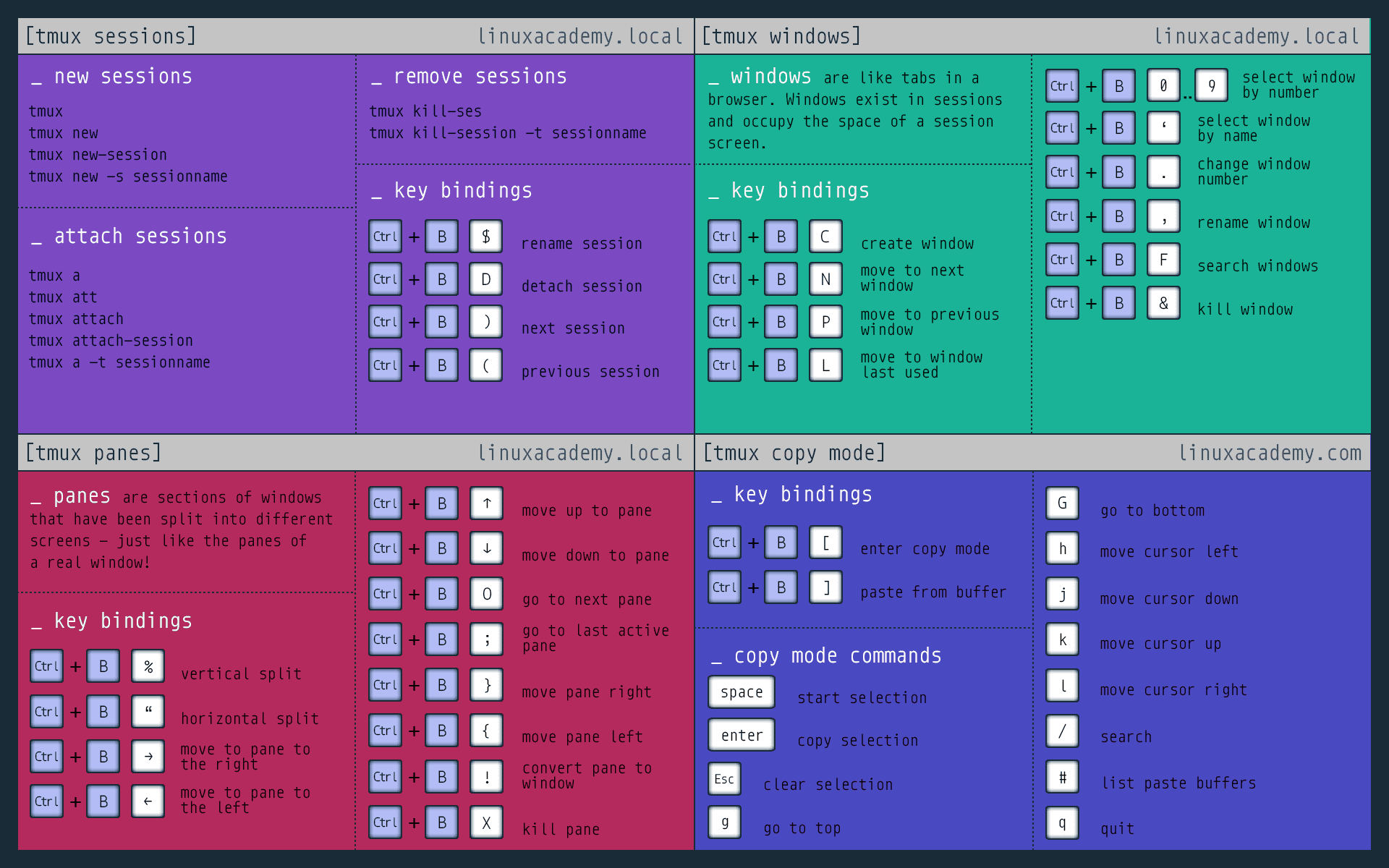
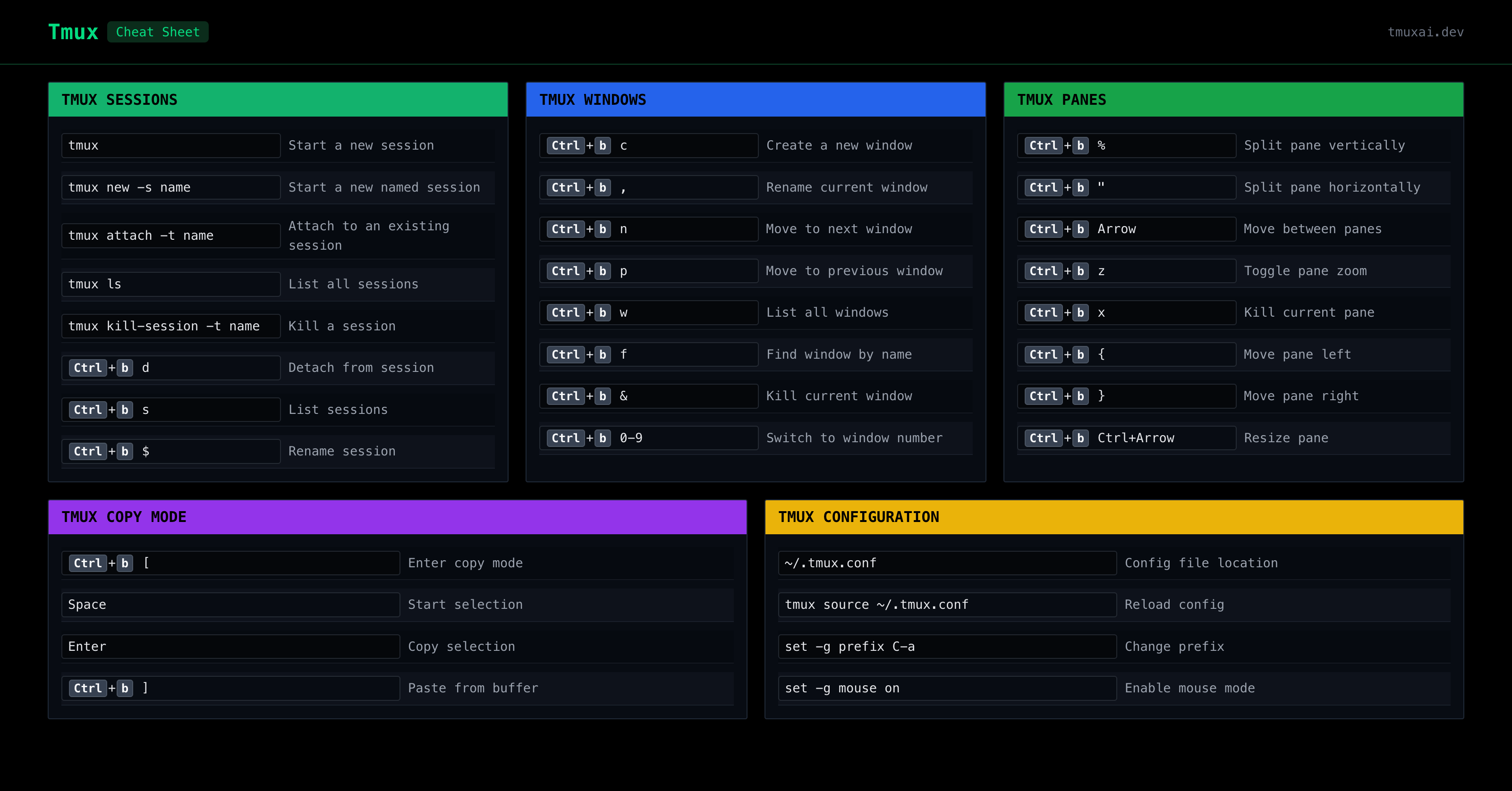
常用命令
tmux new -s <session_id>连接到指定 session:
tmux attach -d -t <session_id>连接到最近的 session:
tmux attach保存最近 N 行输出到本地文件:
tmux capture-pane -p -J -S -100 > ./tmux_stdout.log一键配置
cp ~/.tmux.conf ~/.tmux.conf.bakwget https://raw.staticdn.net/Hansimov/blog/main/docs/notes/configs/.tmux.conf -O ~/.tmux.conf && tmux source ~/.tmux.conf.tmux.conf 完整样例
# TMUX Guide
#   https://tmuxguide.readthedocs.io/en/latest/tmux/tmux.html#tmux-conf
# tmux(1) - Linux manual page
#   https://man7.org/linux/man-pages/man1/tmux.1.html#FORMATS
# 256 Colors - Cheat Sheet - Xterm, HEX, RGB, HSL
#   https://www.ditig.com/256-colors-cheat-sheet

# kill tmux process (if stuck) with following commands
# ps aux | grep tmux
# kill -9 <pid>

# bind keys
unbind C-b
set -g prefix M-z
bind M-z send-prefix

# reload config file
bind r source-file ~/.tmux.conf \; display ".tmux.conf reloaded!"

# enable mouse support
set -g mouse on

# set status style
set -g status-interval 1
set-option -g status-position bottom
set-option -g status-style bg=default
set-option -g status-left ""
set-option -g window-status-format ""
set-option -g window-status-separator ""
set -g window-status-current-format "#[fg=cyan] #{pane_title}: [#{pane_current_path}]"
set-option -g status-right "#[fg=cyan,bold] [ww%V.%w] %m-%d %H:%M:%S"

# [Tip] To reset set-option, use following cmd:
#       set -gu <option>

# set pane border style
set -g pane-border-status top
set -g pane-border-lines heavy
set -g pane-border-style bg=default,fg=cyan
set -g pane-active-border-style bg=cyan,fg=black

# rename pane title
# tmux select-pane -t <pane-idx> -T <pane-title>
setw -g pane-border-format ' #{pane_index}: [#{pane_current_path}] '

# start selection with 'space' and copy using 'y'
# bind -t vi-copy 'y' copy-selection

# paste using 'p'
# unbind p
# bind p paste-buffer

# bind keys for copy mode
unbind -n a
# bind-key -n M-a copy-mode
unbind-key -T root         MouseDrag1Pane
unbind-key -T copy-mode-vi MouseDrag1Pane
unbind-key -T copy-mode    MouseDrag1Pane
# bind-key -T copy-mode MouseDrag1Pane copy-selection -x
# bind-key -T copy-mode-vi MouseDrag1Pane copy-selection -x

# [Tip] Shift+LeftMouse select can copy text to clipboard,
#       and Shift+Insert can paste from clipboard

# which zsh
set-option -g default-shell /usr/bin/zsh

# set buffer lines
set-option -g history-limit 100000

# List of plugins
set -g @plugin 'tmux-plugins/tpm'
set -g @plugin 'tmux-plugins/tmux-resurrect'

# Restore programs
set -g @resurrect-hook-pre-restore-pane-processes 'tmux kill-session -t=0 2>/dev/null || true'
set -g @resurrect-processes '\
    ssh mongosh \
    "~elasticsearch->elasticsearch *" \
    "~kibana->kibana *" \
    "~npx->npx *" \
    "~npm->npm *" \
    "~python->python *" \
    "~echo->echo *" \
    "~quasar dev->quasar dev *" \
    "~./frpc->./frpc *" \
    "~docker->docker *" \
    "~ssh->ssh *" \
    "~cloudflared->cloudflared *" \
    "~gpustat->gpustat *" \
    "~run_at_boot.sh->~/run_at_boot.sh" \
    "~gpu_mon->gpu_mon *" \
'

# Initialize TMUX plugin manager (keep this line at the very bottom of tmux.conf)
run '~/.tmux/plugins/tpm/tpm'
安装插件管理器 tpm
Tmux Plugin Manager
A list of tmux plugins.
下载代码仓库:
git clone https://github.com/tmux-plugins/tpm ~/.tmux/plugins/tpm在 .tmux.conf 末尾添加:
# List of plugins
set -g @plugin 'tmux-plugins/tpm'

# Initialize TMUX plugin manager (keep this line at the very bottom of tmux.conf)
run '~/.tmux/plugins/tpm/tpm'
重新加载配置:
# type this in terminal if tmux is already running
tmux source ~/.tmux.conf
安装会话恢复插件 tmux-resurrect
tmux-resurrect: Persists tmux environment across system restarts.
Restoring programs
Undo the last session saved with Tmux Resurrect | by Pasindu Rumal Perera | Medium
安装插件
首先确保已经安装了 tpm 插件管理器。
在 .tmux.conf 的插件列表中添加:
# List of plugins
set -g @plugin 'tmux-plugins/tpm'
set -g @plugin 'tmux-plugins/tmux-resurrect'按下插件管理器的安装快捷键:ctrl+b + I。 等待一会,安装完成会提示按下 Esc 退出。
恢复程序
可以通过 .tmux.conf 中的 set -g @resurrect-processes '...' 命令来指定。不同程序之间用空格分隔。
- 插件默认恢复的程序:sh
vi vim nvim emacs man less more tail top htop irssi weechat mutt - 指定额外恢复的程序:sh
set -g @resurrect-processes 'ssh psql mongosh elasticsearch' - 带参数的程序需加上双引号:sh
set -g @resurrect-processes "kibana serve --host 0.0.0.0 --port 5601" - 不恢复任何程序:sh
set -g @resurrect-processes 'false' - 恢复所有程序:sh
set -g @resurrect-processes 'true:all'
保存和恢复会话
快捷键:
- 保存:
ctrl+b+ctrl+s - 恢复:
ctrl+b+ctrl+r
会话默认保存在:
~/.tmux/resurrect/~/.local/share/tmux/resurrect/
查看保存的会话:
ls -l ~/.local/share/tmux/resurrect输出形如:
lrwxrwxrwx 1 user user   34  7月 28 06:31 last -> tmux_resurrect_20250728T063124.txt
-rw-rw-r-- 1 user user 8172  6月  5 09:07 tmux_resurrect_20250605T090739.txt
-rw-rw-r-- 1 user user 9076  7月  8 05:41 tmux_resurrect_20250708T054126.txt
-rw-rw-r-- 1 user user 8627  7月 21 15:25 tmux_resurrect_20250721T152506.txt
-rw-rw-r-- 1 user user 8708  7月 24 04:22 tmux_resurrect_20250724T042208.txt
-rw-rw-r-- 1 user user 9329  7月 28 06:31 tmux_resurrect_20250728T063124.txt
将 last 对应的 txt 复制到 ~/downloads 中:
cp ~/.local/share/tmux/resurrect/last ~/downloads/tmux_resurrect_last.txt将 last 软链接到其他 txt:
ln -s ~/.local/share/tmux/resurrect/tmux_resurrect_XXXX.txt ~/.local/share/tmux/resurrect/last配置示例
# List of plugins
set -g @plugin 'tmux-plugins/tpm'
set -g @plugin 'tmux-plugins/tmux-resurrect'

# Restore programs
set -g @resurrect-processes '\
    ssh psql mongosh \
    "~elasticsearch->elasticsearch *" \
    "~kibana serve->kibana serve *" \
    "~python->python *" \
    "~quasar dev->quasar dev *" \
    "~./frpc->./frpc *" \
    "~docker->docker *" \
'

# Initialize TMUX plugin manager (keep this line at the very bottom of tmux.conf)
run '~/.tmux/plugins/tpm/tpm'
开机自动恢复 tmux 会话
清理临时会话
nano ~/.tmux.conf添加:
set -g @resurrect-hook-pre-restore-pane-processes 'tmux kill-session -t=0 2>/dev/null || true'创建 systemd 服务
设置无须登录即可启动:
sudo loginctl enable-linger "$USER"# show user linger status
# loginctl show-user "$USER" -p Linger
# disable linger
# sudo loginctl disable-linger "$USER"创建 systemd 服务文件:
nano ~/.config/systemd/user/tmux-restore.service写入如下内容:
~/.config/systemd/user/tmux-restore.service:
[Unit]
Description=Restore tmux sessions with tmux-resurrect
After=network-online.target
Wants=network-online.target

[Service]
Type=oneshot
RemainAfterExit=yes
# run tmux server (with temp session)
ExecStart=/bin/bash -lc '/usr/bin/tmux has-session 2>/dev/null || /usr/bin/tmux new-session -d'
# run resurrect restore script
ExecStart=/usr/bin/tmux run-shell %h/.tmux/plugins/tmux-resurrect/scripts/restore.sh
# [Optional] save tmux sessions on stop
ExecStop=/usr/bin/tmux run-shell %h/.tmux/plugins/tmux-resurrect/scripts/save.sh

[Install]
WantedBy=default.target
启用服务
重启服务守护进程:
systemctl --user daemon-reload启用并开启服务:
systemctl --user enable --now tmux-restore.service查看服务状态:
systemctl --user status tmux-restore查看服务日志:
journalctl --user -u tmux-restore.service -b --no-pager | tail -20会话恢复时,运行一次性脚本
~/run_at_boot.sh:
#!/bin/zsh

echo "=========================================="
echo "[$(date '+%Y-%m-%d %H:%M:%S')] Running boot tasks..."
echo "=========================================="

# Start Xvfb (virtual framebuffer for headless GUI)
echo "RUN: Xvfb"
Xvfb -ac :99 -screen 0 1280x1024x16 &

# IPv6 route setup
echo "RUN: webu.ipv6.route"
echo $SUDOPASS | sudo -S env "PATH=$PATH" python -m webu.ipv6.route

# Set file descriptor limit
echo "RUN: ulimit -n 1048576"
ulimit -n 1048576

# Keep the script running with an interactive shell
# This ensures tmux-resurrect sees "run_at_boot.sh" as the running process
# and will restore it on next boot

echo "=========================================="
echo "[$(date '+%Y-%m-%d %H:%M:%S')] Boot tasks completed! Press Ctrl+C to exit, or keep this pane open for auto-restore on reboot."

# Use a read loop to keep the script alive while allowing interaction
while true; do
    read -r cmd
    if [[ -n "$cmd" ]]; then
        eval "$cmd"
    fi
done
在 .tmux.conf 中添加:
set -g @resurrect-processes '\
...
    "~run_at_boot.sh->~/run_at_boot.sh" \
...
在第一个 tmux 窗口中运行该脚本:
exec ~/run_at_boot.sh该脚本会在运行指定的命令后,始终保持交互式 shell 运行状态,从而确保 tmux-resurrect 能够检测到该脚本并在下次启动时恢复它。
查看是否在恢复的会话列表中:
grep "run_at_boot" ~/.local/share/tmux/resurrect/lastpane <session> 0 1 :* 0 <host> :/home/<user> 1 zsh :/bin/zsh ./run_at_boot.sh手动恢复 tmux 历史会话
如果想手动恢复 tmux 会话,可以运行:
tmux has-session 2>/dev/null || (tmux new-session -d && tmux run-shell ~/.tmux/plugins/tmux-resurrect/scripts/restore.sh)